
AfterNET Mumble Server
Ever wonder what your IRC friends sound like in real life? Would you like to voice-chat with friends while you game?
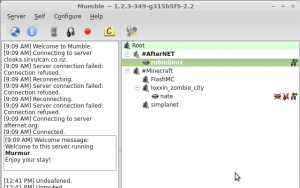 We have set up a Mumble server open for AfterNETers to voice-chat with eachother, or in groups. Conversations are grouped into channels similar to IRC. Come try it out:
- Get a Microphone: Many laptops have them built in. Or use a headset.
- Download a Mumble client: Get Mumble
- Configure your sound card: The first time Mumble runs a wizard will help you. Please configure it to use 'push to talk' rather than voice activation. We find voice activation to cause annoying open-mic events.
- Configure a push-to-talk shortcut. I like Right-Shift. Under settings→Shortcuts, click Add: Function=push to talk, shortcut=Shift_R
- Connect to afternet.org : Open Server→Connect. Click “Add New...” and enter us: Label is AfterNET, Address is afternet.org, port is 64738. For username, set your afternet authserv account. (Not currently required but may be tied in later). Then click Connect!
- Drag your username to the #AfterNET channel to say hi